-
Shop
- Adidas
- Advanced Technologies
- AI Skills for Creators & Freelancers
- AI Client Management
- AI Ethics
- AI Mindset
- AI Tools & Prompts
- AI Writing & Content Creation
- Audio, Voice & Music
- Design & Visual Creation
- Email, Messaging & Communication
- Freelancing & Business
- Marketing, Ads & Conversion
- Productivity, Workflow & Automation
- SEO & Search Optimization
- Social Media Content & Growth
- Strategy, Planning & Analytics
- Video Creation & Editing
- Beauty
- Best-Sellers
- Car Accessories
- Car Buying & Ownership
- Confidence
- Dating & Social Skills
- Digital Resources
- Education & Learning
- Family & Parenting
- Fashion
- Accessories
- Alexander McQueen
- Bags
- Bags & Wallets
- Balenciaga
- Belts
- Blazers
- Bottega Veneta
- Brunello Cucinelli
- Burberry
- Chanel
- Chloé
- Dior
- Dolce & Gabbana
- Dresses
- Etro
- Fendi
- Gucci
- Hats & Hair Accessories
- Hoodies & Sweatshirts
- Jewelry
- Jil Sander
- Keychains
- Kiton
- Luggage
- Miu Miu
- Off-White
- Outerwear
- Prada
- Rick Owens
- Saint Laurent
- Shoes
- Socks & Tights
- Sweaters & Cardigans
- The Row
- Tom Ford
- Tops & Shirts
- Valentino
- Valentino Garavani
- Versace
- Vivienne Westwood
- Watches
- Fashion Accessories
- Furniture
- Gadgets
- Health & Beauty
- Health & Wellness
- Home & Garden
- Home Styling & Organization
- Home Supplies
- Kids & Babies
- Kitchen Best-Sellers
- Parenting & Child Development
- Patio, Lawn & Garden
- Personal Growth
- Personal Style & Fashion
- Pet Care
- Pet Lifestyle & Wellness
- Pet Supplies
- Pets
- Smart Home Living Guides
- Sport & Outdoors
- Stress Relief & Relaxation
- Super Deals
- Travel
- Travel & Adventure
- Wealth
- Wellness
MMCX Hi-Res Dynamic IEMs: Dual Plug, Punchy Sound
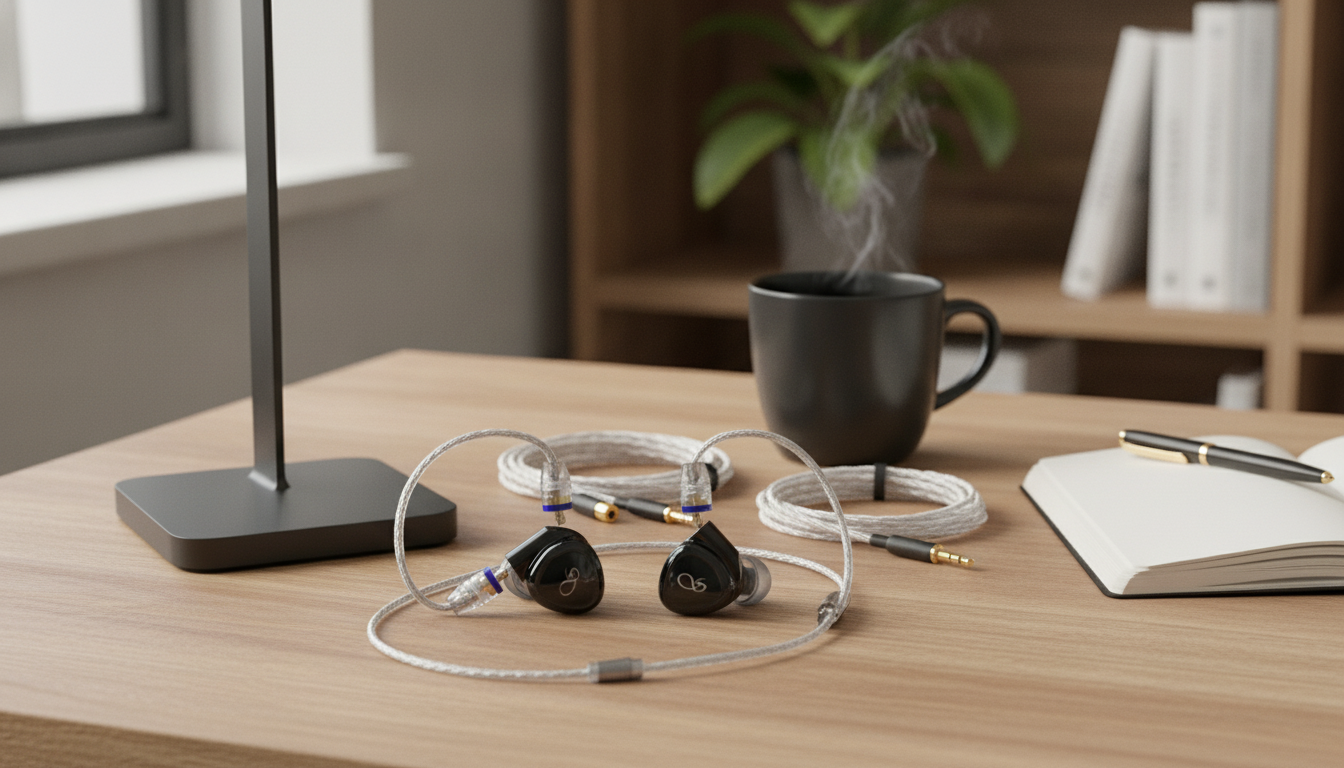
Hi-Res Dynamic In-Ear Earphones with MMCX Cable & Dual Plug Options
Built for listeners who want a clean, energetic dynamic-driver sound with the flexibility of detachable MMCX cables and multiple plug choices, these in-ear earphones aim to simplify daily use across phones, laptops, and dedicated audio players while keeping upgrades and replacements straightforward.
If you’ve ever had a favorite pair sidelined by a failing cable—or found yourself juggling adapters between devices—this modular setup is designed to keep the routine simple without giving up that lively, punchy “dynamic driver” feel.
What Makes These In-Ear Earphones Stand Out
- Dynamic-driver tuning designed for punchy bass impact with a natural sense of note weight
- Detachable MMCX cable for easier replacement, maintenance, and future cable upgrades
- Dual plug options to match different devices and reduce the need for adapters
- Compact in-ear format suited to commuting, desk listening, and travel
- A practical choice for anyone who prefers modular parts over fixed-cable earphones
For shoppers who want a straightforward, upgradable daily driver, the Hi-Res Dynamic In-Ear Earphones with MMCX Cable & Dual Plug Options are built around the two things that most often decide long-term satisfaction: fit and reliability.
Core Features at a Glance
- Focus on modular connectivity: MMCX cable plus selectable plug types depending on the device used most
- Everyday durability advantage: when the cable wears out, it can be swapped without replacing the entire earphone
- Hi-Res positioning: intended for higher-quality playback chains and lossless libraries where detail retrieval matters
- Convenience for mixed setups: easy switching between a phone dongle, laptop, and portable player
Quick Checklist: Comfort, Connectivity, and Use Cases
| Category | What to look for | Why it matters |
|---|---|---|
| Cable | MMCX detachable connection | Replaces a common failure point; enables upgrades and balanced/portable cable options (if supported) |
| Plug | Choose the plug style that matches your main device | Better compatibility and fewer adapters; can improve day-to-day reliability |
| Fit | Multiple ear tip sizes and a secure seal | Seal controls bass response and helps with passive noise reduction |
| Sound | Dynamic-driver punch with clear mids/treble | Good for modern genres while staying versatile for vocals and acoustic music |
| Use case | Commute, office, travel, casual hi-fi | Sets expectations for isolation needs and microphone/controls requirements |
Sound Character: What to Expect from a Dynamic Driver
- Bass: typically delivers fuller slam and physicality than many ultra-lean tunings; seal quality strongly affects bass output
- Midrange: aims to keep vocals and instruments present without sounding overly thin; a good fit helps maintain tonal balance
- Treble: intended to add clarity and edge definition; tip choice can soften or brighten perceived treble
- Dynamics: lively rise-and-fall of volume and impact, especially noticeable on drums and bass lines
- Soundstage and imaging: in-ears create a compact stage; channel matching and fit consistency help stable imaging
One practical note: “Hi-Res” playback benefits most when the source is quiet and clean. Even well-made earphones can be held back by a noisy headphone jack or a low-quality adapter. Headphone measurement standards like IEC 60268-7 exist because small changes in fit and coupling can alter perceived frequency response—exactly what most people notice when tips don’t seal consistently.
MMCX Cable Benefits: Modularity Without the Hassle
- Replacement simplicity: a worn or intermittently cutting cable can be swapped in minutes
- Upgrade path: optional cables can change handling (softer jacket, less microphonics) and add features (in-line mic, different plug)
- Travel readiness: keeping a spare cable reduces downtime during commutes or trips
- Maintenance advantage: cleaning around connectors and storing properly can extend connection longevity
- Handling note: MMCX connectors are designed to rotate; avoid forcing angles when inserting/removing to reduce wear
Detachable cables are less about “audiophile tinkering” and more about ownership cost. If the driver housings are still in great shape, replacing only the cable is usually the fastest way to get back to listening—especially if you’re hard on pockets, backpacks, and desk edges.
Dual Plug Options: Matching Your Playback Gear
Plug Choice Guide (Pick the One That Fits Your Main Device)
| Plug choice | Best match | Notes |
|---|---|---|
| Standard single-ended (common on many devices) | Laptops, many dongles, older phones, controllers | Most universal option; easiest for shared devices |
| Alternative plug option (varies by configuration) | Portable audio players or specific adapters | Choose based on the output you use most to reduce the need for extra adapters |
Fit, Comfort, and Isolation
Better isolation isn’t just about comfort—it also supports safer listening habits. Guidance from NIOSH emphasizes limiting exposure to high volume over time; a good seal often lets you keep volume lower while still hearing details.
Daily Use: Pairing with Phones, Laptops, and Music Players
Care and Longevity
Who These Earphones Fit Best
More In-Stock Finds
- Amazing Song Pudding Bag — a distinctive, giftable accessory pick.
- Ride On Push Car for Toddlers — a fun, practical option for little ones.
FAQ
Are MMCX cables interchangeable with all MMCX earphones?
MMCX is a widely used standard, but fit and retention can vary slightly by brand and connector tolerances. For best results, use a well-made MMCX cable and disconnect by gripping the connector housing rather than pulling the wire.
Do different ear tips change the sound noticeably?
Yes—tip size and material can noticeably change bass quantity, perceived treble, and overall comfort because they affect the seal. Trying multiple sizes (and silicone vs foam) is often the fastest way to find the best balance.
Which plug option should be chosen for a phone and a laptop setup?
Choose the most universal plug that matches the device you use most often to minimize adapters and extra connection points. If an adapter is required for one device, prioritize a sturdy option and avoid bending or tugging at the plug.
Recommended for you
Was this article helpful?
Yes
No







Leave a comment